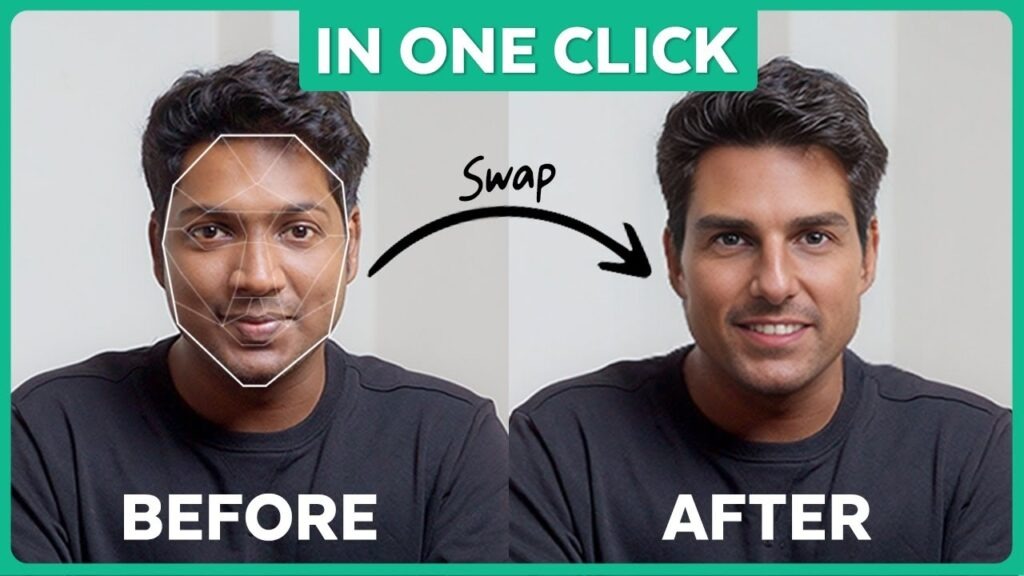
Artificial Intelligence has transformed the way we create digital content, and one of the most exciting innovations today is face swap AI. You can easily, quickly, and possibly without expert ability, be content to create entertaining social media videos, hilarious memes or simply experiment with face-swapping in photographs, and the AI technology enables you to do all this.
In this guide, I’ll show you how face swap AI works, the best tools to use, tips to make your results realistic, and ethical considerations to keep in mind. By that point, you will be able to produce your own work, which looks professional and refined.
Key Takeaways
- Face swap AI uses artificial intelligence to replace faces in images and videos.
- The better the input (videos or photos) is, the more realistic the output will be.
- Several tools allow beginners to try face swap AI with free or trial options.
- It should be used ethically so as not to be abused or give a false impression.
- A step-by-step methodology will make you attain professional results.
What Is Face Swap AI and How Does It Work?
At its core, face swap AI works by analyzing facial features and expressions, mapping them onto a target face, and blending them seamlessly into the video or image. In comparison with conventional editing, AI follows small movements, lighting, and angles frame by frame, which, as its result, appears natural.
The process involves:
- Face recognition: The software recognizes faces in your photo or video.
- Feature mapping: Features like the mouth, jawline, and eyes were mapped.
- Face replacement: Your target face will be seen to be mixed with the original media.
- Rendering: The last output is processed by the AI to give an appearance of a smooth and realistic output.
Thanks to modern face swap AI platforms, anyone can achieve high-quality results within minutes, whether for entertainment or creative projects.
Why Face Swap AI Is Gaining Popularity
Over the past few years, AI-driven content has exploded in popularity, and face swap AI is at the forefront. Some reasons include:
- Viral social media trends: individuals are fond of the short, funny, or surprising video clips.
- Accessibility: Access to lots of tools is free or online.
- Entertainment and customization: This feature of swapping faces in a meme, movie, or video gives it a personal and funny touch.
For instance, a friend of mine used face swap AI to place his face onto a popular movie scene for a TikTok challenge. The video went viral in a few hours, which demonstrated how well-produced AI swaps could go viral.
Best Tools to Try Face Swap AI
If you’re ready to experiment, several platforms make face swap AI accessible:
- DeepSwap AI – web-based system, simple to use.
- FaceMagic – AI quickly replaces video and images.
- Reface – an entertaining template application that works on mobile devices.
Some of the factors to consider when choosing a platform are the quality of output, ease of use, and privacy policies. Most platforms allow you to test a free version, giving you a risk-free way to explore face swap AI.
Step-by-Step Guide: Using Face Swap AI
Step 1: Choose Your Media
Begin with a photo of high-resolution photo or a video clip of short and clear video clip. The AI works better with a well-lit source material, one that is focused and has a clear facial angle.
Step 2: Post to Your Social Network of Choice.
Post the video or picture with the face that you want to exchange. Numerous systems provide a drag-and-drop interface, therefore being simple enough to use with beginners.
Step 3: Adjust Settings
Depending on the tool, you can choose to make facial expressions, smoothness, or the level of blending. Spend a couple of minutes and preview various adjustments.
Step 4: Preview the Output
Always look at the preview with the misfits or mismatches of colors. When the outcome is not natural, then think of a better photo or a minor change in the placement of the face.
Step 5: Export Your Face Swap AI Creation
Export your media in a format similar to the MP4 in the case of a video or the JPEG/PNG in the case of an image. Commented and posted accordingly on social media or to your audience.
Tips for Realistic Face Swap AI Results
- Match lighting: In both your original picture and your destination media, utilize equivalent lighting, as it will allow easier integration.
- Pure faces: Overextremes in facial expression may disorient AI mapping.
- Video clips: Short video clips can lead to minor glitches during swapping.
- Clear videos and photos are the high-resolution input that will lead to the most natural results.
- Experiment with multiple platforms: Different face swap AI engines produce slightly different outputs; testing helps you find the best one.
Common Mistakes to Avoid
- Low-quality photos or videos- this results in blurred swaps or distorted swaps.
- Excess use of filters or makeup – AI can confuse facial parts.
- Disregard of consent – using other people’s faces without their consent may result in both moral and legal problems.
- Setting the bar too high – practice and slight modifications are major.
Learning from mistakes and testing different approaches is part of the fun and art of face swap AI.
Moral Issues and confidentiality.
Video Face swap AI technology is powerful, but comes with responsibility. Keep these rules in mind:
- Always ask anyone whose face you make use of.
- Do not write something that will misguide or harm an individual.
- Make it very clear that it is AI-generated content.
- Use a reliable application that does not collect media and keeps it stored unnecessarily.
By following ethical guidelines, you can safely enjoy face swap AI without legal or moral issues.
When to Consider Paid Face Swap AI Tools
Whereas free tools are fine in the experimentation stage, professional users could desire:
- Higher-quality HD output
- Advanced facial tracking
- Multiple videos Batch Processing.
- Commercial use rights
Such features are available on platforms such as DeepSwap Pro or Synthesia Studio, and are therefore of use to creators, marketers, and social media influencers who require professional outcomes.
Conclusion
Face swap AI is a creative and accessible way to generate entertaining and unique content. When you use the above step-by-step guide and tips, you can come up with professional-looking swaps without prior experience in doing so. Always remember to apply the technology in an ethical way, make sure to protect privacy, and enjoy the experiments.
Whether for social media, memes, personal projects, or professional content, face swap AI provides endless possibilities for creativity, humor, and storytelling.