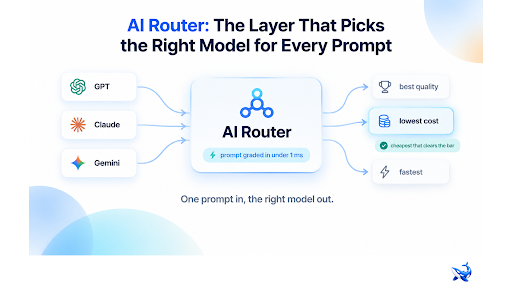
An ai router is the layer that decides which AI model answers each request your application sends — the intelligence between your code and every provider API. The full span of models a router can choose from includes GLM-5.3; this piece is the plain-English, category-level version of what an AI router is, what problem it removes, and how it sits next to things you may already run, like an AI gateway.
Here is the decision most teams are quietly facing: you subscribe to three or four model providers, each shipping new models every quarter, and your prompt reads exactly the same no matter which one answers it. The only open question — the one your code currently hard-codes — is who answers. That hard-coded choice is the entire problem an AI router exists to remove.
Why one hard-coded model stopped working
A single pinned model used to be a fine architecture. You picked the strongest model you could afford, called it from every code path, and shipped. Two things broke that pattern.
First, the catalog exploded. A small team can now choose among open-weights and closed-weight models from providers such as OpenAI, Anthropic, Google, Meta, Mistral, xAI, DeepSeek, Qwen, GLM and MiniMax — and each vendor iterates every few months. Pinning to one model means your product’s ceiling is whatever that one vendor released last.
Second, the cost spread between models is enormous and has nothing to do with usefulness. A fast, cheap model can summarize a paragraph just as well as a frontier flagship — sometimes better, because it is faster — at a fraction of the price. And the inverse bites: a small model confidently wrong on a tricky reasoning task costs more than the price tag, because you pay for the failure downstream.
So teams end up with a spreadsheet of trade-offs — quality, latency, price, rate limits — and a codebase full of if-statements trying to encode them. That manual routing is where the AI router comes in.
What an AI router actually does
An AI router is a middleware layer that takes each incoming prompt, figures out what kind of work it is, and forwards it to the best-suited model from the ones you have access to. You keep one API endpoint in your code; the router owns the choice of which provider and model does the work.
The key word is each. An AI router does not pick one model per product or per endpoint — it re-decides on every single request, because two prompts that look identical can need completely different models. “Explain this error message” is a small-model job. “Explain it in the context of our entire codebase and tell me which dependency introduced it” is a flagship job. The router treats them as two different decisions.
That per-request granularity is what separates a router from a simple fallback chain. A fallback is a fixed ladder: try A, then B, then C. A router is more like a dispatcher: it looks at the request, applies policy, and picks the cheapest option that will do the job — not the cheapest option, full stop. Production routers grade the prompt in under a millisecond before deciding where it goes [OrcaRouter, product page, verified 2026-08-22].
How an AI router decides
The decision engine under the hood is three steps stacked on each other.
Grade the prompt. First, the router figures out what the request actually demands — classification, creative writing, long-context retrieval, math, tool calling, or a multi-step agent task. Simple heuristics (prompt length, language, whether tools are involved, structured output) get it most of the way there. Then the prompt gets a difficulty score, which is compared against the quality bar.
Apply your rules. You tell the router what you care about, and it respects it. Policies might be: never spend more than X per million tokens on a chat request; keep p95 latency under a target; always use a frontier model for financial or medical answers. This is where routing stops being generic and becomes your routing.
Pick the cheapest model that clears the bar. This is the payoff rule. Instead of asking “which model is best?” — which always resolves to the most expensive one — the router asks “which models are good enough, and which of those costs least?” Routine traffic goes to a cheap fast model; the flagship is reserved for the handful of prompts that genuinely need it.
The economics are worth spelling out. If 80% of your traffic is routine and 20% needs the expensive model, you have just moved 80% of your bill down by an order of magnitude — without making quality worse, because average cost now matches the actual difficulty of each request.
The payoff: cost, reliability, and one integration
The measurable wins from adding an AI router cluster into three buckets.
Lower cost. Because every request is priced by difficulty rather than by the highest model you’ll deploy, spend drops in proportion to how lopsided your traffic is. This compounds when the router passes provider list prices through unchanged. One production router, for example, carries over 200 models behind a single API key and passes the vendor list price through at 0% markup — “provider price, no $0.00 added” — so routing down to a cheaper model saves real money rather than reshuffling a markup [OrcaRouter, product page, verified 2026-08-22].
Fewer failures. Routers double as failover. If the chosen provider is down, rate-limited, or returning errors, the router re-routes the request to the next model that meets your bar. Automatic failover is a built-in capability on most serious router products [OrcaRouter, product page, verified 2026-08-22], which turns a provider outage from a user-facing incident into a background log line.
One integration. Instead of shipping an SDK per provider and maintaining a switchboard, you ship one client pointed at the router. New models appear on the provider side; the router’s catalog grows; your code does not change — the model layer becomes replaceable.
AI router vs AI gateway: two layers, one stack
A common source of confusion is the AI gateway, because the two tools are deployed in the same place and both sit between you and the providers. The distinction is scope.
An AI router answers one question per request: which model? An AI gateway answers the whole set of questions a production front door has to answer — authentication, rate limiting, caching, observability, budgets, key management — and, yes, routing. Think of the router as the decision function and the gateway as the building around it.
| Concern | AI router | AI gateway |
| Primary job | Picks which model answers each prompt | Manages the whole request path to providers |
| Routing logic | Core function — grades and dispatches | One feature among many |
| Rate limiting, auth, budgets | Usually out of scope | Core responsibilities |
| Observability | Basic request logs | Per-request logs, costs, roles |
| Mental model | The dispatcher | The front door (including the dispatcher) |
If you only need to stop hard-coding model choices, you need a router. If you need to secure and govern every call your team makes to every model — including the router itself — you need a gateway, which can host routing inside it. In practice the two are increasingly bundled, which is why the terms blur.
Where an AI router does not help
An AI router is not a magic quality multiplier. If every model you have access to is bad at a task, routing does not invent a good one — it just picks the least-bad option. And it cannot fix a bad product decision: if your prompts are poorly written and nobody has verified which model is actually good at your workload, no routing layer substitutes for doing that homework first.
The minimum viable setup is honest about this. Before you route anything, you need a small evaluation set — a few dozen prompts you have checked by hand — so “the bar” means something concrete.
The takeaway
An AI router is the layer that stops your code from making a permanent choice about a temporary market: it grades every prompt, applies your rules, and sends the request to the cheapest model that clears your quality bar. The payoff is measurable — lower spend on routine traffic, automatic failover when a provider stumbles, and a single integration that stays put while the model catalog churns underneath it. It is not a replacement for knowing your workload, but once you do, a router is the cheapest way to make the model layer disposable. Start with a router if your pain is hard-coded model choices; graduate to a gateway when governance, budgets, and observability become the bottleneck.
Sourcing note: OrcaRouter product facts — one API key for 200+ models, 0% markup pass-through of provider list prices, adaptive routing with prompts graded in under 1 ms, and automatic failover — are from OrcaRouter’s own product pages (https://www.orcarouter.ai and https://www.orcarouter.ai/solutions/adaptive-routing), verified 2026-08-22. The general claims about model providers, catalog breadth and cost spread reflect the category at large and the facts file for this article cluster; no third-party benchmark data is cited here.