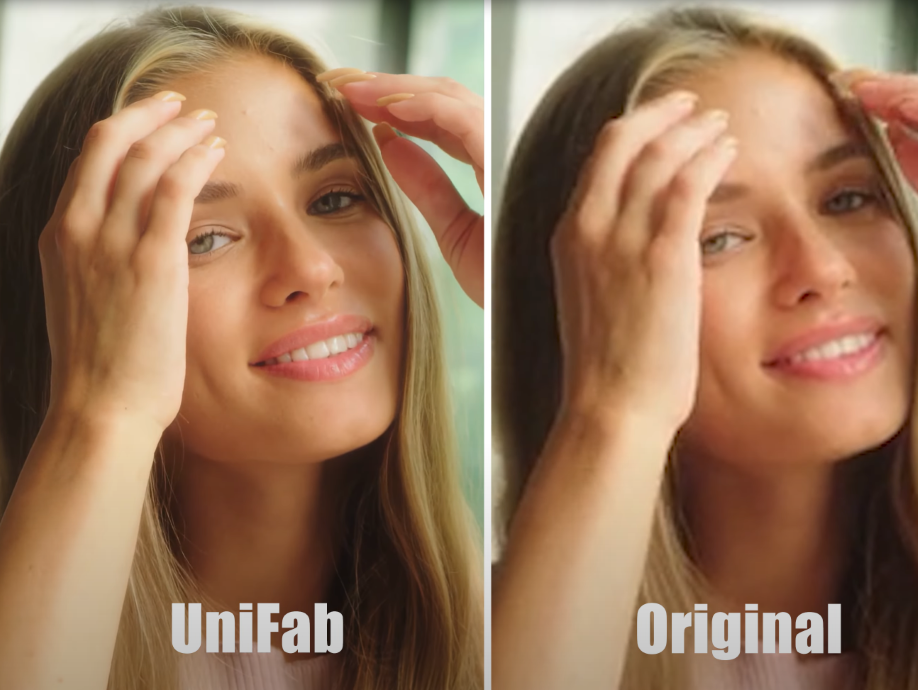
If you’ve ever pulled up an old clip on a laptop or TV and thought, “Why does this look so much worse than I remember?”, you’re not alone. As screens keep getting sharper, older or heavily compressed videos tend to reveal every flaw—soft edges, washed-out colors, and more pixelation than you’d expect. With video becoming the main form of communication online, viewers now expect clarity almost by default.
The good news is that improving resolution isn’t just something professionals do in studios. With a few smart approaches and the help of modern tools like UniFab Video Upscaler AI, even everyday users can give their videos a noticeable upgrade.
Resolution has always played a big role in how we perceive video quality. It’s usually described in pixel dimensions—for example, 720p, 1080p, or 4K. More pixels generally equal more detail, which makes the image feel cleaner and more lifelike. But older recordings or downloaded clips often come in much lower resolutions, and that mismatch becomes very obvious on modern displays.
Take a VHS-era family video or a clip saved from a years-old phone. When played back on a 4K monitor, it tends to look soft or blocky. Increasing the resolution won’t magically turn it into cinema-level footage, but it does help restore enough detail to make it more enjoyable and easier on the eyes.
Traditional Ways to Enhance Videos
In the past, video enhancement commonly relied on interpolation methods to resize images by estimating the color and brightness of new pixels based on nearby ones. While these methods increase size, the results often are blurry or feature jagged edges because no new image details are truly recovered.
Some users also manually sharpen videos with editing software or adjust contrast and brightness to make details stand out. While these tweaks can help visually, they don’t increase the inherent resolution or restore lost fine details.
Exploring Modern Enhancement Solutions
More recently, AI Video Upscaler tools have emerged that significantly improve video quality by intelligently enhancing images. One practical example is UniFab Video Upscaler AI, which helps users upscale videos to higher resolutions with better detail and reduced noise. This tool stands out because it offers a straightforward experience, allowing users to improve video clarity without professional editing skills or expensive equipment.
By leveraging the power of machine learning, UniFab analyzes the content in your video and applies enhancements that look natural and preserve important details. Users find this especially useful for restoring older footage, converting standard videos for 4K displays, or simply polishing content before sharing.
How UniFab Video Upscaler AI Helps
Over the past few years, AI-driven enhancement has changed the way upscaling works. Instead of stretching existing pixels, AI tools analyze the video and reconstruct finer details that weren’t clear in the original. UniFab Video Upscaler AI is an example of this new generation of tools, and it comes with several enhancement models tailored for different kinds of footage:
Texture Enhanced – Gives surfaces and small details more definition.
Anime Optimized – Ideal for animation, preserving crisp lines and vibrant colors.
Speed Optimized – Produces faster results when you need efficiency without sacrificing too much quality.
Quality Optimized – Focuses on sharper edges and overall clarity for the cleanest possible output.
What makes these options useful is that you’re not forced into a single enhancement style. Whether you’re working on a family vacation video, an animation clip, or a business presentation, you can choose the mode that fits the footage best.
Tips to Make the Most of Your Videos
Before you jump into upscaling, a few simple habits can help improve the results:
Start with the best version you can find
If you still have the original recording, use that instead of a copy you downloaded from social media. Every compression step removes more detail.
Avoid repeated exporting
Saving a video multiple times as a compressed file (like MP4) gradually reduces its quality. Try to keep the number of exports to a minimum.
Do basic cleanup first
Light edits—such as mild brightness adjustments or correcting color casts—can make the enhancement results more consistent.
Choose the right AI model
UniFab’s four models exist for a reason. An animation clip will respond very differently from a nature video, so choosing carefully usually leads to better results.
Everyday Benefits of Video Enhancements
Upscaling isn’t just something content creators or editors appreciate. It benefits anyone who deals with video:
Family recordings shot on early smartphones can look clearer and more modern.
Social media creators can make their content stand out with sharper visuals.
Businesses can improve e-learning materials, product demos, or presentation videos.
Old security footage sometimes reveals more detail after enhancement.
In many cases, the difference between the original and the enhanced version is immediately noticeable.
Looking Ahead
Video enhancement continues to evolve, and the technology is becoming more accessible each year. What once required complex editing knowledge is now achievable with a few clicks. Tools like UniFab Video Upscaler AI, with their range of processing modes, give users the flexibility to work with all kinds of footage and goals.
Higher-quality video is no longer a privilege reserved for professionals—it’s within reach for casual users, small businesses, educators, and anyone who simply wants their videos to look better.
Conclusion
Improving video resolution doesn’t have to be complicated. By combining basic video-editing practices with modern AI tools such as UniFab Video Upscaler AI, you can revive older recordings, refine new footage, and make your content look more polished overall. With enhancement modes like Texture Enhanced, Speed Optimized, Quality Optimized, and Anime Optimized, you can tailor your approach to match your video’s personality and purpose.
Backlinks Hub highly experienced SEO Team with over 4 years of experience. WE are working as contributors on 1000+ reputable blog sites. If You Need Guest Post and Our Seo Services Contact.