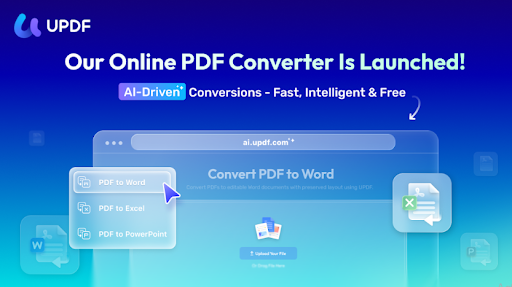
What is the UPDF PDF Converter Online Tool?
Convert PDF online refers to the process of extracting and reusing content from Portable Document Format (PDF) files by converting them into editable and machine-readable formats through web-based tools.
Since PDFs are mainly designed for reading rather than editing, UPDF helps users easily convert PDF content—such as text, tables, and forms—into editable formats like Word, Excel, PowerPoint, or images, while keeping the original layout intact. This makes it much easier to update, share, or reuse PDF documents in daily work, study, or personal projects, all without installing extra software.
In addition to online PDF conversion, UPDF offers a range of practical tools, including compression, merging, watermarking, OCR, and e-signing. Users can start with its free online features and, if needed, switch to the desktop version for more advanced editing and batch processing across Windows, Mac, iOS, and Android. This flexible setup allows UPDF to suit both casual users and those who regularly work with PDF files.
How to Convert PDFs Online in Simple Steps
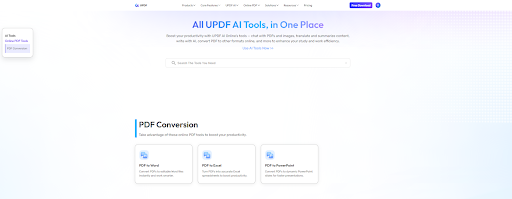
To convert a PDF online in simple steps, just follow this quick workflow: First, visit a online PDF converter online like UPDF Online, Smallpdf, or PDF24. Then, upload your PDF file via drag-and-drop or file selection, choose your desired output format—such as Word, Excel, or PowerPoint—and click the “Convert” button. Finally, once the processing completes, download your converted file. Most tools delete your files from their servers automatically, keeping your documents safe. It’s a fast, no‑install solution that works on any device.
PDF to Word
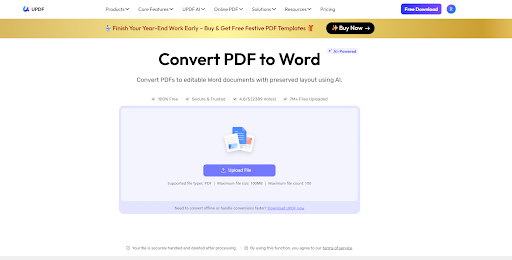
- Firstly, upload your PDF by clicking on the button “Upload File” or dragging your PDF file to the online PDF to Word Converter.
- Once your file is uploaded, you need to click on the “Convert PDF” in the bottom-left toolbar button to start the conversion process.
- Now, UPDF Online PDF to Word Converter finishes the conversion in seconds. You can click on the “Download” button to download converted Word for editing or further use.
PDF to Excel
- Click the “Upload File” button or drag and drop your regular or scanned PDF into UPDF PDF to Excel Converter Online to import it.
- Once your PDF is uploaded, click “Convert PDF” In the new window, UPDF will start converting your PDF. For scanned PDFs, UPDF automatically recognizes the content and converts it into editable Excel.
- Once the conversion is complete, click the download icon to save the Excel file to your device.
PDF to PowerPoint
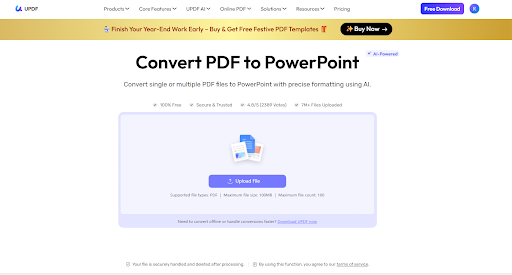
- Click the “Upload File” button to open your file browser, then select the PDF files you wish to convert and upload them to the UPDF PDF to PPT converter.
- Once your PDF file is uploaded, click the “Convert PDF” button to begin converting it into a PowerPoint presentation.
- In just a few seconds, your converted PowerPoint file will be ready. Click the download button to save it to your computer.
Use Cases for Different Users
Students converting lecture Notes
- Assignments involve the systematic process of transforming raw, often disorganized, information from classes into structured, personalized, and actionable study resources.
- This goes beyond simply typing up handwritten notes; it is an active learning strategy where students distill complex material into clearer formats—such as summarized outlines, digital flashcards, concept maps, or synthesized study guides—often while transitioning from analog to digital mediums.
Professionals handling reports
- Professionals systematically transform raw data and unstructured information from reports, contracts, and spreadsheets into clarified, actionable insights and standardized formats, a process essential for operational clarity and strategic decision-making.
- This conversion involves distilling lengthy reports into executive summaries, translating complex contractual language into compliance checklists and key-term abstracts, and manipulating spreadsheet data into visualized dashboards, charts, and financial models.
- By restructuring and synthesizing this information, professionals not only enhance accessibility and accuracy but also identify critical trends, obligations, and opportunities, thereby bridging the gap between dense documentation and practical business intelligence, ensuring informed actions, risk mitigation, and streamlined organizational communication.
Businesses managing large volumes of documents
- Businesses managing large volumes of documents engage in a critical process of systematic conversion, standardization, and centralization to transform disparate, unstructured files—ranging from invoices and legal contracts to customer records and internal reports—into a searchable, secure, and actionable digital asset library.
- This involves deploying document management systems (DMS) and enterprise content management (ECM) platforms that utilize optical character recognition (OCR), automated workflows, and metadata tagging to index and categorize information.
- By converting chaotic paper trails and digital clutter into an organized, governed knowledge repository, businesses enable efficient retrieval, ensure regulatory compliance, facilitate seamless collaboration across departments, and unlock valuable data insights, ultimately driving operational efficiency, reducing risk, and supporting data-informed strategic decisions.
Freelancers and remote workers needing quick file conversion
- Freelancers and remote workers, operating in dynamic and often bandwidth-sensitive environments, rely on efficient file conversion to ensure seamless collaboration and professional delivery, often utilizing specialized tools like UPDF for their core needs. The requirement extends beyond simple format changes (like Word to PDF or JPG to PNG); it involves preparing client-ready documents by compressing large files for email, converting scanned contracts into editable and OCR-searchable text, optimizing presentation files for different platforms, and securely redacting sensitive information before sharing
- . This rapid conversion capability is non-negotiable, as it directly impacts workflow fluidity, client satisfaction, and the ability to meet tight deadlines from any location, making a reliable, all-in-one converter like UPDF essential for maintaining a competitive, agile, and professional remote operation.
Why use UPDF online PDF?
AI-Powered Assistance: The primary advantage of the online version is its AI functionality, powered by models like GPT-5, which acts as an intelligent assistant for documents.
Scholar Research & Paper Search: Easily find academic papers and scholarly sources related to your topic, then explore key ideas without jumping between multiple platforms. It helps streamline research by bringing relevant studies and references together in one place.
Summarization and Explanation: Quickly get concise summaries of long documents or ask the AI to explain complex concepts and data within a PDF.
Translation: Translate entire PDF documents in over a dozen languages while preserving the original formatting and layout.
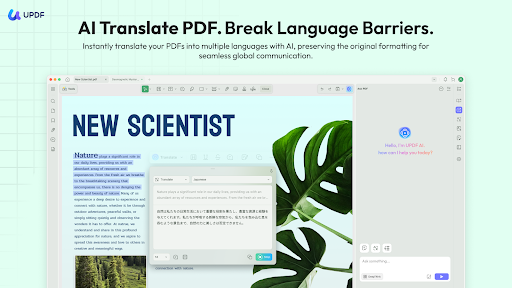
Chat with PDFs: Engage in a conversational Q&A with your documents to quickly extract specific information without manual searching.
Mind Map Generation: Automatically convert document content into a visual mind map, which is particularly useful for learning, brainstorming, and organization.
Accessibility and Convenience: As a web-based tool, it offers immediate access from any device with an internet connection.
No Installation Required: You can use the core online features directly in your browser for quick, on-the-go tasks.
Cross-Platform Syncing: The UPDF Cloud allows you to store and sync your documents, ensuring a seamless workflow between the online version and the desktop/mobile apps.
Cost-Effective Alternative: UPDF Discount is often cited as a more affordable alternative to competitors like Adobe Acrobat, offering a robust suite of features for a lower price.
Security: Data security is a priority, with features like SSL/TLS encryption for file transfers and a commitment that document content is not used to train AI models or shared with third parties.
Conclusion
For those who need a comprehensive, AI-enhanced solution for managing PDFs efficiently across multiple platforms, the UPDF online tools provide significant time-saving benefits for students, professionals, and researchers. You can explore the features with a free trial of UPDF.