What Specs, Cooling, and Power Supply Do You Actually Need to Build a Stable RTX 5090 Gaming PC?

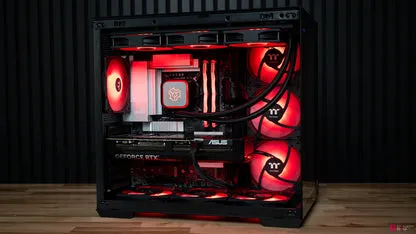
Building a high-end gaming PC has never been more demanding, especially with the arrival of RTX 5090 Gaming PCs. As NVIDIA’s most powerful GPU to date, the RTX 5090 pushes performance boundaries further than any previous generation. But with its incredible capabilities comes a new level of responsibility: ensuring that your components, cooling, and power delivery can support such a beast.
Whether you’re planning a custom build or comparing Next Day Gaming PC options, knowing the exact requirements of the RTX 5090 is crucial. The GPU is designed for extreme 4K, 8K, VR, and AI-accelerated workloads, meaning your system must be stable, cool, and reliably powered if you want peak performance.
This detailed guide covers the essential specs, ideal cooling setup, and recommended power supply required to build a stable RTX 5090 gaming machine. By the end, you’ll know exactly what your system needs to run flawlessly.
1. Understanding the RTX 5090: Why the Specs Matter
NVIDIA designed the RTX 5090 to dominate the ultra-high-end GPU category. Benchmarks show massive improvements in:
- Ray tracing
- AI-powered upscaling
- Raw rasterisation performance
- 4K and 8K frame rates
- GPU-accelerated workloads like rendering, simulations, and machine learning
To support this extreme hardware, every component around it must be equally powerful or risk bottlenecking, overheating, or unstable performance.
2. CPU Requirements: Which Processors Can Keep Up With the RTX 5090?
The RTX 5090 is so powerful that mid-tier CPUs will bottleneck it heavily. To get the most out of RTX 5090 Gaming PCs, aim for elite-tier processors only.
Recommended CPUs for RTX 5090 Gaming PCs
Best AMD Choices
- Ryzen 9 9950X
- Ryzen 9 9900X
- Ryzen 9 7950X3D
Best Intel Choices
- Intel Core i9-14900K
- Intel Core i9-14900KF
- Intel Core i9-13900K
Why These CPUs?
- High core counts
- Excellent clock speeds above 5 GHz
- Strong single-core and multi-core performance
- Future-proof for several GPU generations
- Perfectly matched for 4K/8K gaming
If you’re using your RTX 5090 for workstation tasks like rendering or AI training, then the extra cores will deliver massive performance benefits.
3. RAM Requirements: How Much Memory Does an RTX 5090 Build Need?
Modern engines, 4K textures, and AI workloads require significantly more RAM than older GPUs. To avoid memory bottlenecks, you need a minimum of:
Minimum RAM for RTX 5090 Builds
- 32GB DDR5
Recommended RAM for Maximum Stability
- 64GB DDR5 6000MHz+
Why DDR5?
- Higher bandwidth
- Lower latency
- Better multitasking
- Improved power efficiency
For creators who run Blender, Unreal Engine 5, or heavy productivity applications, 64GB or even 128GB can be extremely valuable.
4. Storage Requirements: Fast SSDs Are No Longer Optional
The RTX 5090 is capable of loading extremely high-resolution textures very quickly, and your storage must keep up.
Minimum Storage Setup
- 1TB NVMe SSD
Recommended Setup for a High-End Build
- 2TB NVMe Gen 4 SSD as primary drive
- Optional 4TB secondary SSD for game storage
Why Not HDD?
Mechanical drives are far too slow for modern game assets and DirectStorage features.
Why NVMe SSD Is Crucial:
- Faster load times
- Instant texture streaming
- Better stability in large open-world games
- Smoother 4K/8K render performance
Gen 5 SSDs are even faster and future-proof but not required.
5. Motherboard Requirements: What Should Support the RTX 5090?
Your motherboard needs to be robust enough to handle powerful CPUs, fast RAM, and the power draw of next-gen GPUs.
Must-Have Motherboard Features
- PCIe 4.0/5.0 x16 slot
- Strong VRM cooling
- At least 3–4 M.2 NVMe slots
- DDR5 support
- High-quality heatsinks
- WiFi 6 or 6E + 2.5G/10G Ethernet
Recommended Motherboards
For AMD:
- X670E motherboards
- B650E high-end boards
For Intel:
- Z790 flagship boards
Cheaper boards may struggle with heat or power delivery when paired with a 5090.
6. Cooling Requirements: Keeping the RTX 5090 Cool
The RTX 5090 is powerful and generates significant heat, especially at full load. Cooling becomes a major priority.
GPU Cooling Requirements
Most RTX 5090 cards ship as:
- Triple-fan air coolers, or
- AIO liquid-cooled models
Both options work, but airflow in the case must be excellent.
CPU Cooling Requirements
High-end CPUs paired with the 5090 generate extreme temperatures. You need:
Minimum Recommendation
- 240mm AIO liquid cooler
Best Recommendation
- 360mm or 420mm AIO liquid cooler
Why AIO?
The heat output of an RTX 5090 gaming PC is simply too much for standard air coolers. To avoid thermal throttling, you need strong cooling for both CPU and GPU.
Case Requirements: Airflow Matters More Than Looks
Even the fastest components fail when heat builds up.
Ideal Case Features
- Full-tower or large mid-tower
- Mesh front panel
- 6+ high-airflow fans
- Side ventilation
- Room for large GPUs
This ensures heat leaves the system quickly, improving life span and boosting performance stability.
7. Power Supply Requirements: How Much Power Does an RTX 5090 Need?
The RTX 5090 is extremely power-hungry, with peak draws that can spike unexpectedly under heavy workloads. Stability depends heavily on your PSU quality.
Minimum Power Supply for RTX 5090 Gaming PCs
- 1000W Gold PSU
Recommended for Maximum Stability
- 1200W Platinum PSU
Ideal PSU Features
- ATX 3.0 support
- Native 12VHPWR cable
- High-quality capacitors
- Overcurrent/overvoltage protection
- Fully modular design
Why So Much Power?
The RTX 5090 can exceed 600W at peak loads, and high-end CPUs can add another 200–300W. Add fans, SSDs, lighting, and you can easily approach 1000W+ during spikes.
A cheap PSU can cause:
- Crashes
- Power throttling
- Component damage
- Fire risk
Always choose premium brands for safety.
8. What About Prebuilt Next Day Options?
If building your own system seems overwhelming, many brands now offer Next Day Gaming PC options with the RTX 5090 already installed.
These prebuilts include:
- Proper cooling
- Stable power supplies
- Balanced CPU/GPU combinations
- Motherboards supporting future upgrades
- Professional cable management
- Full system testing
This is ideal for gamers who want the power of the RTX 5090 without the hassle of assembly or risk of component mismatch.