Top 9 Slide Generators for Businesses: Budget-Friendly Corporate Deck Makers


Stop wasting 100+ hours: the 9 best AI slide generators for 2026
Office pros lose 20 hours a month tweaking slides, says GfK. Multiply that across 30 million daily presentations and the wasted time is staggering.
New AI generators flip the script. They draft, design, and even narrate decks in minutes, freeing you to focus on the message.
This guide ranks nine standout options for 2026 by speed, content quality, brand control, workflow fit, price, security, and unique time-savers—so you can reclaim those hours from PowerPoint purgatory.
Why this list? Scope, sources, and what made the cut
We reviewed the top twenty Google results for “AI presentation maker” and “best slide tools 2026,” then compared them with recent round-ups from Zapier and TechRadar to capture mainstream opinion.
We also read Reddit posts in r/PowerPoint and r/marketing, browsed Product Hunt launches, scanned G2 ratings, watched YouTube demos, and checked each tool’s changelog for consistent updates during the past 18 months.
A platform had to meet four standards to reach our final nine:
- Active user traction or a marketplace rating above four stars.
- At least one plan under forty dollars per user each month.
- PPTX or PDF export without watermarks.
- Published security posture and a record of regular feature releases.
Tools built solely for classrooms, missing basic exports, or showing stalled development did not advance. The remaining shortlist reflects genuine business value rather than hype.
How we scored the tools (and why it matters)
Choosing a slide generator is not about appearances. We rated each platform against seven work-day criteria.
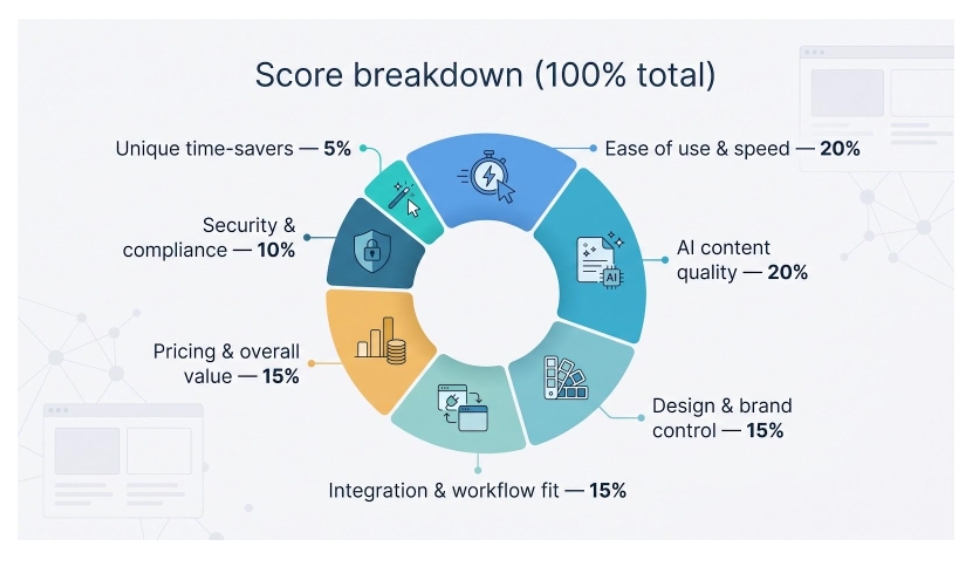
Ease of use and raw speed accounted for twenty percent. If the tool can draft ten slides before your coffee cools, it scores high.
Another twenty percent measures AI content quality. We want generators that understand structure, not ones that dump walls of text.
Design and brand control hold fifteen percent. A platform that respects your style guide keeps Marketing happy.
Integration and workflow fit earn the same fifteen percent. Working inside PowerPoint or Google Slides matters to teams that dislike switching apps.
Pricing and overall value contribute another fifteen percent. Budget-friendly plans gain an edge.
Security and compliance carry ten percent, favoring providers with published credentials such as SOC 2 Type II. Plus AI meets this bar on its security page.
The final five percent rewards unique touches that remove one more click. Combine these weights and you have our ranked list.
1. Plus AI: native PowerPoint muscle with enterprise guardrails
Plus AI tops the list because it respects your workflow and protects your brand. Installing the add-in adds an “Idea to deck” button to PowerPoint or Google Slides that instantly drafts slides while keeping every element on-brand, a feature highlighted on www.plusai.com. Type a short brief, pick your company template, and Plus fills each master layout with on-brand copy, charts, and images. No exports, no formatting cleanup.
Plus AI add-in generating on-brand slides inside PowerPoint.
Remix and Rewrite save extra minutes. Select any slide, choose Remix, and Plus suggests fresh layouts that still follow your slide master. Use Rewrite to view GPT-powered copy variations so you can polish wording fast.
Security teams can relax. Plus holds full SOC 2 Type II compliance, encrypts data at rest and in transit, and never trains public models on your content. You can share sensitive quarterly numbers without legal pushback.
Pricing sits in the sweet spot. Ten dollars per user each month covers core generation. The thirty-dollar Team tier adds shared custom templates, a bargain compared with Copilot’s thirty-dollar premium for AI access.
If you need a pristine .pptx and want AI inside PowerPoint or Slides, Plus AI delivers a productivity lift you can adopt today.
2. Gamma: rapid drafts and multi-format storytelling
Gamma’s core advantage is speed. Type a prompt, sip your coffee, and a ten-slide draft appears in under sixty seconds, complete with images, section headers, and sensible pacing. Need to pivot? A quick chat with the built-in AI assistant rewrites entire sections without breaking layout.
Gamma AI presentation generator drafting slides from a prompt.
The platform looks beyond slides. The same content can turn into a scrollable web page or PDF handout, perfect for quick follow-ups. A generous free tier (roughly eight full decks) lets you experiment before spending a dime, while paid plans provide custom branding and analytics that show who viewed each card.
Export fidelity is Gamma’s weak spot. Send a deck to PowerPoint and you may spend about twenty minutes nudging fonts into place. If your final deliverable must be a spotless .pptx, budget that cleanup time. For brainstorming, internal reviews, or startups racing an investor deadline, Gamma creates a first version faster than any other tool in this list and still offers flexible output options.
3. Google Slides + Gemini: real-time ideation for cloud-native teams
If your team already works in Docs, Sheets, and Drive, Gemini feels like a simple power switch. Inside Slides, the Help me create panel accepts a plain-language prompt such as “five-slide pitch for a mobile fitness app” and returns titles, bullet points, and image slots within seconds.
Because it runs inside Workspace, Gemini draws context from your existing files. Link a Sheet, ask for “a regional sales chart,” and the assistant builds the graphic without a CSV export. Collaboration stays live: one teammate writes a prompt, another refines wording, and a third swaps visuals, all in the same deck.
Gemini matches Copilot on enterprise security, but the add-on costs between twenty and thirty dollars per user each month, which can strain small budgets. Templates remain basic, so import a custom theme if you want a fresh look. For startups and global teams anchored in Google, Gemini turns Slides into an always-ready brainstorming partner.
4. PowerPoint + Copilot: AI help without leaving Office
Copilot earns fourth place because it removes the biggest adoption hurdle—your team already works in PowerPoint. Click the icon, ask for “a 12-slide QBR using last quarter’s Excel numbers,” and the assistant builds charts, speaker notes, and an agenda in minutes. No exports, no new log-ins, just the familiar ribbon with GPT-4 at your side.
Microsoft PowerPoint Copilot generating a QBR slide deck.
Direct access to SharePoint and Teams files is the real advantage. Copilot can retrieve the slide you built for Finance last year or quote the latest meeting transcript word for word. Security teams breathe easier; data stays within Microsoft’s tenant and follows existing permissions.
Price is the trade-off. At thirty dollars per user each month on top of Microsoft 365, Copilot tops this list. Creative style also stays tied to your current template, so an outdated master yields an outdated look.
For large organizations seeking measurable productivity gains and willing to fund the license, Copilot transforms PowerPoint from a time sink into a focused, capable assistant.
5. Pitch: real-time collaboration with startup polish
Pitch feels like Google Slides and Figma had a productivity-focused child. Several teammates can comment and edit slides at once, while status labels track ownership, ending the shuffle of files named “final v7.”
Design keeps pace. Templates look ready for a Series A deck, and the brand style panel locks colors and fonts so every slide stays consistent. Need an outline fast? Click “Generate with AI” and Pitch suggests section headers and key points you can drag onto the canvas.
Pitch earns its spot through speed of iteration. The workspace stores decks like a mini CMS, analytics show which slides hold investor attention, and recent updates add AI translations plus video recording for async demos.
Drawbacks exist. Complex animations still need PowerPoint, and exporting to PPTX can shift spacing enough to bother perfectionists. The Pro plan starts at eight dollars per user each month, positioning Pitch as an affordable choice for teams that want live editing without sacrificing aesthetics.
6. Beautiful.ai: brand police with a design degree
When every pixel must match the style guide, Beautiful.ai is the ally to choose. Its Smart Slide engine locks layouts, fonts, and colors so nobody can slip in an off-brand shade of blue. Drop in a bullet or swap an icon, and the design rebalances on the spot.
Brand governance leads, but polish seals the deal. Even the individual Pro plan (about twelve dollars per user each month) produces decks that look agency quality without the agency bill. Upgrade to the Team tier and you gain shared libraries plus slide analytics that show which pages hold a prospect’s attention.
Trade-offs appear in speed and creative freedom. DesignerBot drafts an outline more slowly than Gamma, and the layout guardrails can feel tight if you like to experiment. Pricing also rises for large groups. For companies where consistency beats experimentation, Beautiful.ai still delivers showroom-ready slides every time.
7. Canva: an all-in-one studio for lean teams
Canva takes seventh because it covers more than slides, a benefit for small teams that juggle many assets. On the free tier you get thousands of presentation templates, a drag-and-drop editor that feels like building blocks, and an ample stock-photo library.
Canva presentation editor and Brand Kit for small teams.
The upgrade to Canva Pro unlocks Brand Kit, which fixes your fonts and colors so every deck, flyer, or LinkedIn banner stays consistent. Magic Design prompts you for a topic then returns a first-draft slide set with visuals in seconds. The AI text is basic, but the structure removes blank-page anxiety.
Exports can shuffle fonts when you move to PowerPoint, so plan a quick review. For small businesses or marketers balancing logos, social posts, and slides in one afternoon, Canva delivers broad capability at a coffee-budget price.
8. Jotform Presentation Agents: self-playing decks that talk back
Imagine a deck that not only presents for you but also answers questions while you sleep. Jotform Presentation Agents add voice narration and live chat to any slides you import or create in Jotform.
Jotform Presentation Agents self-playing deck interface screenshot.
For training modules, on-demand demos, or onboarding, the agent works like a tireless presenter. Viewers type a question, the bot replies based on slide content, and the exchange is logged for follow-up. You can even embed a form mid-deck to collect leads or quiz comprehension.
Creative control is the compromise. Jotform’s design tools remain basic compared with Canva or Beautiful.ai, and unlimited agent views start at the Bronze tier. Treat Presentation Agents as a handy add-on, not a primary design studio. When asynchronous engagement outweighs pixel-perfect aesthetics, Jotform sits comfortably at number eight.
9. Alai: fast drafts on a shoestring
Alai lands at number nine for one reason: speed on a student-level budget. Open the site, type “10-slide pitch for a vegan café,” and a skeletal deck appears before you refill your mug.
The interface is clean; no sidebars or nested menus, so even a PowerPoint novice can tweak a headline and export to PPTX in under five minutes.
That simplicity is also the limit. Layouts top out at a handful of clean themes, and brand controls are absent. Plan to add your colors and icons later. Security features remain basic, making it a poor fit for confidential deals.
Alai excels at rapid prototyping. Founders testing storylines, consultants mapping workshops, or students racing a deadline will appreciate its fire-and-forget approach. When time and cost outweigh polish, Alai is the fastest option in the list.
Quick-glance comparison matrix
Need the facts fast? The table below lines up all nine tools so you can spot the best fit in seconds.
| Tool | Headline strength | Ideal user | Starting price | Free tier? | Native PPTX output | Security notes |
| Plus AI | Works inside PowerPoint/Slides | Consultants, enterprise teams | $10 user/mo | Trial | Yes | SOC 2 Type II |
| Gamma | Fastest first draft | Startup founders, educators | $0 | Yes | Needs cleanup | SOC 2 Type II |
| Beautiful.ai | Strict brand design | Marketing & sales orgs | $12 user/mo | Trial | Limited (image slides) | SOC 2 Type II |
| Canva | All-in-one visual suite | Small businesses | $0 | Yes | Yes (minor quirks) | SOC 2 & ISO 27001 |
| PowerPoint Copilot | Deep Microsoft integration | Large enterprises | $30 user/mo add-on | No | Native | Microsoft tenant security |
| Google Gemini | Real-time cloud ideation | Google-centric teams | $20 user/mo add-on | No | Native | Google enterprise controls |
| Pitch | Live collaborative editing | Product & growth teams | $8 user/mo | Yes | Yes (minor quirks) | Enterprise plan in progress |
| Alai | Rapid drafts | Students, solo founders | $0 | Yes | Yes | Basic encryption |
| Jotform Agents | Self-narrating decks + Q&A | Trainers, lead gen | $34 org/mo | Trial | Import required | HIPAA-ready (forms) |
Conclusion: pick your path
Every company values time differently. Some crave raw speed, others need strict branding, and a few must keep risk-averse IT auditors happy. Use the quick guide below to decide.
If your workflow revolves around PowerPoint or Google Slides, stay native. Plus AI adds AI help for ten dollars per user, while Copilot or Gemini bring enterprise features if you can justify the higher fee.
Need rapid idea drafts? Gamma creates decks in about a minute and costs nothing to try. Pair it with Canva’s free tier when you want extra visuals without spending more.
Prioritising brand consistency? Beautiful.ai locks every slide to the style guide. Pitch offers similar control with live collaboration, ideal for product or growth teams that iterate daily.
Looking for a deck that sells while you sleep? Jotform Presentation Agents present, answer questions, and record every lead message for follow-up.
When budgets are tight or deadlines loom, Alai produces a draft in seconds and lets you refine later in PowerPoint.